ALT_IMG

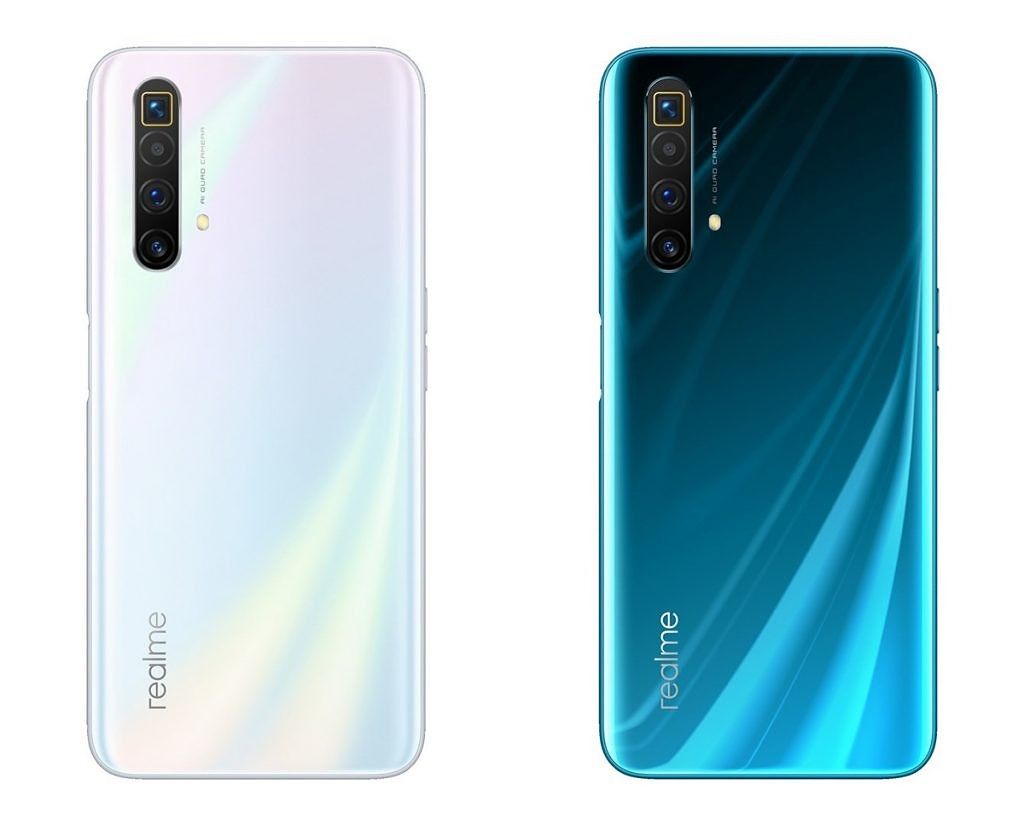
Realme X3 SuperZoom launches with the Snapdragon 855+ and 120Hz display

Design-wise, the Realme X3 SuperZoom looks quite similar to the X50 5G, which launched in China at the beginning of the year. It features a similar-looking 6.6-inch Full HD+ display with an LCD panel and a high 120Hz refresh rate. The display is protected under Gorilla Glass 5. Since this is an LCD and not an OLED panel, the X3 SuperZoom features a side-mounted fingerprint scanner – also seen on the X50 5G as well as the Realme 6 and 6 Pro. Readmore...

ALT_IMG

LG Optimus G Pro (Unlocked)

LG F240S Optimus G Pro 4G LTE is a new and updated version of Optimus G smartphone and comes with notable enhancements in display, size and processor. It features a huge 5.5-inch True Full HD IPS Plus LCD that essentially makes it a phablet. Readmore..

Alt img

Features Canon 650D and Nikon D5200 Which One is Best?

The beginner segment is always interesting to discuss, because the camera in this segment is still quite affordable but its already abundant and can be therefore people are no longer interested in buying a more expensive camera class. Readmore...

Alt img

Review OPPO Find 5

In 2013 was the triumph of mobile phones with a screen resolution of Full HD TV rival. OPPO Find 5 is one of them, 5 inch screen includes a resolution of 1920x1080 pixels. This makes the screen OPPO Find 5 has a density of 441ppi, alias the same as the Sony Xperia Z and HTC Butterfly. Readmore...

ALT_IMG

9 Smartphone with Most Durable Battery in the World

9 Smartphone with Most Durable Battery in the World. In addition to its features, things we should consider when choosing smartphones are the specifications, one of which is the battery life. Smartphone useless we have a sophisticated but battery endurance for a while, we will be annoyed at having to often to charge our smartphones. Readmore...

Showing posts with label Tips. Show all posts
Tuesday, April 11, 2023

Tips for Choosing a Good Phone and As Needed

0 komentar


Here is a review of tips on how to choose a good cellphone that suits your needs.

When buying a new cell phone, be sure to know some tips so you don't choose the wrong one and get a quality product. So how do you choose it? Here's the review.

How to choose a new cellphone that suits your needs is actually not too difficult. Especially now that there are more and more smartphones available on the market, ranging from cheap to premium class that you can choose from. You only need to understand the needs of the cellphone you want to buy.

By choosing a smartphone that suits your needs, it will be easier for you to carry out various activities with this new smartphone, 

see the following reviews of tips for choosing a good smartphone that suits your needs.

1. Adjust your budget



The first thing to consider when choosing a new cellphone is to make sure the budget you have matches the price of the gadget you want to buy.

You can adjust your financial capabilities to choose a new cellphone. If your budget is limited, then you can choose some cheap cell phones with large RAM, which are widely available on the market.

But if budget is not your main obstacle, then you can choose some of the latest cellphones that have the support of qualified specs and features so that once you use them you are very comfortable and support increased productivity.

2. Choose a cellphone from a well-known brand


Sometimes, some consumers choose smartphones from familiar brands that are well known to the public.

This is reasonable because as a layman, of course, you want to get a smartphone that is of high quality and easy to choose.

One example is Samsung, which has no doubt about its quality.

In addition, its after sales service is also qualified so that if the unit has a problem it can be easily brought to a service center which is easy to find and spread in almost all major cities in the country.

3. Check RAM Capacity


RAM is an important component that needs to be considered when choosing a good new HP.

To support optimal performance, you can choose a smartphone that has a large RAM capacity.

With the support of a large RAM capacity, smartphone performance is getting lighter, multitasking is getting smoother so you can download many of your favorite games or applications.

4. Select a Qualified Processor


Tips on how to choose a good and durable cellphone, then what needs to be considered is to choose a smartphone that has qualified processor support.

Apart from choosing a smartphone with large RAM, choose a fast processor so that the resulting performance is maximized and supports a variety of mobile activities that are more comfortable and efficient.

5. Battery Capacity


Pay attention to the battery capacity of the smartphone you want to buy. Because the latest smartphones are now increasingly sophisticated and have many applications, of course, require large power consumption, therefore you can choose a smartphone that has a large battery capacity.

Choosing a cellphone with large battery support has many advantages, including being able to play games longer, being able to stream your favorite movies all day and not having to worry about running out of power when traveling or leaving the house so you don't need a power bank which is quite complicated when you leave the house.

We hope that the tips on how to choose a cell phone that is good and according to your needs above will be useful for you so that you can get a quality smartphone and get a cell phone that fits the needs you need at this time.

Source from  HERE

Continue reading →
Monday, January 19, 2015

Tips on Securing Online Account from Hackers

0 komentar
 Securing online account
Tips on Securing Online Account from Hackers - breaker or easier a system we call the hacker is the greatest threat to anyone whose activities cyberspace.Both activities work or just playing around in the world of social networking. Most of us, still underestimate account burglary cases committed by people who are not responsible. They generally act as the curiosity to test its ability to actually have a purpose why breaking into another person's account.
As an example of just that recently occurred, there are hackers to hack someone's Facebook account. The account owner is initially normal, maybe there dibenaknya assume that the hacker that was just for fun without having any purpose. But it turned out to be the act of the hackers increasingly lead to fraud. He randomly chose a close friend of the owner of the account to send a private message one by one. The contents of private messages are urged everyone to send hack victim had a pulse. No half-hearted, fraud or money usually asks pulse of at least 100 thousand. With all deceit delivered via private message, many close friends of the victims of mindless hack and money re-transmit pulses in accordance with the request. Understandably, the breaker is often claimed that the victims were hacked earlier accident.
Based on the above case, it will make you more wary managing online accounts owned. Such as Facebook, Twitter, Email, Website login and so forth. Especially the most important is the account that the security of your email should be layered. For that you should prevent burglary is the method that is often underestimated by many internet users. Because indeed Tips Securing Online Account from Hackers that will be discussed in the post is fairly simple but very important to note. Please refer to the tips below:
  • Use Strong Passwords
Is a must for us to use a strong password each accounts we have. But is this really you have done? It did not seem too, because most of us will only use a simple password. Suppose birth date, because it is only by means of the date of birth of the owner will remember it easily. From now on, the better you fix this trivial. Immediately change your password with a stronger again.Enter some combination of numbers, letters and symbols. Make sure your password is not easily guessed by others or people nearby.
  • Use Different Passwords
The number of online accounts owned, making sebagain people prefer to use the same password on every account its online. Both social networks, email and the password for the website / blog. Obviously this is very dangerous, especially if the accounts that you have is very important. Just imagine, when there is one successful your account burglarized such as Facebook. What will happen next? To be sure all the accounts that you have to be brushed off by rogue breaker. And the most frightening is when the breaker has mastered your email account.Therefore, use different passwords on any online accounts you hold.
  • Use Applications business Password
After running to the two previous tips, you are possessed many online accounts will be faced again with a fairly complicated problem, namely the management of passwords. Passwords that are difficult to memorize and vary from one account to another account definitely make you confused. But do not worry, now a lot of free applications that have utility for managing your passwords. The author recommends that you use software like Roboform or LastPass. To these two applications are very pupuler among netizens.
  • Use Double Email
A breaker, usually go after primary email account suaru. Because of this primary email are open, it will easily disassemble the breaker you log in to an account. For this reason, do not ever hesitate to make email more than one. Which make the primary email, while others hide them without anyone knows. By practicing this, you will be able to recover the password for an account that is successfully broken through the main email. Quite utilize Forgot password option must be on the faithful forn logged in, you can control your account via email others unknown by others, including the hacker said.
Simple tips above often we underestimate. Though a very large influence on the accounts that we have. There is no harm in practicing step by step over the line in order to keep your account safe, minimally difficult to break into. Because for the author himself, as powerful and as strong as the security of a system, there is still a gap to be exploited by hackers.
Continue reading →
Tuesday, January 13, 2015

10 Tips and How to Distinguish Genuine and Counterfeit Smartphone

0 komentar
The rapid advancement of Technology Latest Gadgets prove that increasing the level of human intelligence. Various innovation and technological gadgets is increasing from year to year. Naturally, if the community is to make the latest gadgets as one of the lifestyle that must be met. Every new series with more advanced technology gadgets, then not a few who are trying to have it even have to wait in line for days to become buyers gadget in question. This has become a phenomenon that can not be avoided. In terms of the development of the telecommunications industry, it is certainly a good impact. But it turns out the impact of the development of lifestyle to have the latest gadget is not only limited to these. It is also often used as an opportunity for a few people to make profits by not not kosher, ie by forging products of the latest smartphone to benefit in a way not true. If this happens to you, you desire smartphone was counterfeit, certainly very painful. Therefore, as consumers we need to also know Smartphone Tips and How to Distinguish Genuine and Counterfeit before we buy it. As quoted from Merdeka.com, here are 10 tips and How to Distinguish Genuine and Fake Smartphone for you from being exposed to fraud by buying a smartphone false. READ detailed specifications

In general, for mobile devices coming out now is able to run on GSM 850/900/1800/1900 networks and a minimum of 3G HSDPA 850/900/1900/2100, but for prosthetic devices can not do it. In addition to the network, from the specification of the processor is also used as the standard assessment. Then, from the capacity of the RAM and ROM it will see the difference. In the original device, in general, the capacity of the RAM and ROM will be greater, while in counterfeit products is very limited even with only 512MB of course. Not only that, camera, screen, Wi-Fi, Bluetooth until the battery can also be used as an assessment of whether the goods are counterfeit or not.
IMEI CODE CHECKS
Indeed, not all devices can use this code, but the majority can do. To check the IMEI number, you can press * # 06 # and the IMEI number has appeared when the screen, try to fit with the IMEI in his box. After that, you can find out where the assembly of the product with a view of the IMEI number series to seven and eight. There are special codes that you can make a referral to see a device of making it on Google.
CEK EXIF ​​DATA USING PHOTO
This method is relatively easy, because by using the data exif photos taken with the camera in the device, it can be seen clearly the authenticity of the smartphone. When you capture an object using a camera on a mobile device, when the results are in check in the Gallery or also when transferred to a PC, the properties will be seen full exif data.
CHECKS WITH APPLICATION BENCHMARK
In this way, it will be more reliable information about the mobile device you want to know the status. Using the Benchmark test application, it can be seen up to speed performance of the device.
CHECK OF DESIGN AND COLOR
In general, each vendor will always have the characteristic of the product release. Although it looks the same, but the shape, design and color of the original and different false. Weight, screen size and detail of the device can also be used as a reference to determine whether the goods are counterfeit or genuine.
CEK WARRANTY CARD
In some ways, this one can not be used as the main reference, because today many 'actors' that have started to make a warranty card which of course is also false. However, not all the fake device makers are able to also make the warranty card. Therefore, although it can not be used as a primary weapon, but the way of identification through the warranty card is also quite effective.
FEEL perfomanya
Of course, if an item is genuine juxtaposed with counterfeit goods, then the end result would indicate that the original device was the one who will come out as winners. In general, access and operation of the prosthetic device is slower and requires patience. That is because the capacity of the RAM contained in it are too small to use with fast multi-tasking.
CHECK DETAILS TEXT
As reviewed in Business Insider (09/15/2013), it is advisable to check the print paper on the device or other objects that come in one package. In general, there will be a typo writing or writings also the output of a particular country. In addition, the print paper in prosthetic devices can easily be lost or faded.
CEK NFC BATTERY CONNECTOR
When you remove the battery from the device, it will show the line of NFC the connector such as tin yellow lines. But in prosthetic devices, NFC Connector will be seen more clearly, while in the original device will look a little more impressed and protected.
COMPARE QUALITY AND MUCH
Of course, the last step that can be done to detect counterfeit goods or not is to look at the quality and price. Comparison of Specs and Price Latest gadgets that you want to purchase should be appropriate. When juxtaposed with the original product, the specifications and the quality of counterfeit goods can not be outmaneuvered. And again, expensive stuff of course has its own qualities. Similarly, the original product that the average marketed at a great price.

Thus the article 10 Tips and How to Distinguish Genuine and Counterfeit Smartphone on this occasion.
Continue reading →
Friday, September 26, 2014

CardRecovery - Special Data Restore Application For Different Types of Memory Cards

0 komentar


Do you have problems on your memory card as no data is lost, deleted, or files are sometimes lost? Application CardRecovery able to do a restore on the various types of memory card so the files can be returned.

A memory card is a tool storage of digital data such as digital images, digital files, digital sound and digital video. This memory card has a capacity measure usually based on standard digital bits that the memory storage capacity of 16MB, 32MB, 64MB, 128MB, 256MB and so on with multiples of two. There are several types of memory cards that until now there are about 43 types. Total capacity of the current biggest is the type CF (Compact Flash) with 8 GB (info: 1 GB = 1024MB, 1048576KB). To read the digital data stored in the memory card into the computer, the device needs a memory card reader (memory card reader).


The following are the types of memory cards that are widely used today:


  •      PC Card / PCMCIA. 
  •      CF (Compact Flash). 
  •      CFII (Compact Flash Type II). 
  •      SD (Secure Digital). 
  •      miniSD. 
  •      microSD / TransFlash. 
  •      SDHC (secure digital higt capacity) 
  •      SM (SmartMedia). 
  •      RS-MMC (Reduced-Size MultiMediaCard). 
  •      MMCmicro. 
  •      MMC (MultiMediaCard). 
  •      MS-Duo (MemoryStick Duo). 
  •      Memory Stick Micro M2. 
  •      xD-Picture. 
  •      MS (MemoryStick). 
  •      Intelligent Stick. 
  •      μ card. 
  •      SxS ™ Memory Card 


Do you ever have difficulty to restore the data therein, be exposed to viruses or any damage to the memory card? CardRecovery application will help you to restore various types of image files and video files on the memory card types such as SD (Secure Digital), CF (Compact Flash), xD Picture, MicroSD, Memory Stick and SDHC, in addition to the memory card recovery application is able to work well for mengebalikan existing files on the phone, flash and other storage devices.

Features and advantages Diwarkan of this application include:


  •      Restore photos deleted accidentally from momory card. 
  •      Restore photos deleted with the Delete All command. 
  •      Memory card is damaged (error). 
  •      The data and sometimes unreadable files sometimes not (corrupt) the recovery process will be done using the search method FAT, ROOT, BOOT sector experiencing problems on your memory card. 
  •      Restoring files caused by damage. 


CardRecovery application will perform file operations Read Only, where this process is more secure method when the data on the memory card you are missing or illegible. This application will be successful in moving the data-recovery by saving them in a folder on the hard drive laptop / computer or as you wish. As for the types of digital files that can be made ​​is the type of image files, video, audio file formats JPG, TIFF, AVI, MPG, MOV, MP4, MP3, WAV, and the like. Also supports Nikon, Canon, Kodak, FujiFilm, Casio, Olympus, Sony, Samsung, Panasonic, and so forth. Supports for recovery flash various brands like SanDisk, Kingston, KingMax, Lexar, PNY, Toshiba, Qmemory, Transcend, Apacer, SimpleTech, Viking, OCZ Flash Media, and others. Here is the data more.


  •      Nikon, Canon, Kodak, FujiFilm, Casio, Olympus, Sony, SamSung, Panasonic 
  •      Fuji, Konica-Minolta, HP, Agfa, NEC, Imation, Sanyo, Epson, IBM, Goldstar 
  •      LG, SHARP, Lexar, Mitsubishi, Kyocera, JVC, Leica, Phillips, Toshiba, SanDisk 
  •      Chinon, Ricoh, Hitachi, Pentax, Kinon, Verbatim, Vivitar, Yashica, Argus, Lumix 
  •      Polaroid, Sigma and a variety of other popular type of camera 
  •      Android, BlackBerry and other smartphone except the iPhone. 


Types of memory cards are supported:


  •      Secure Digital card, SD card, SDHC, miniSD, microSD (TransFlash) card recovery. 
  •      Compact Flash card, CF Type I, Type II, MicroDrive, CF card recovery. 
  •      Memory Stick, Memory Stick Pro, Duo, Pro-HG, XC, Micro (M2) recovery. 
  •      MultiMedia card, MMC card recovery. 
  •      SmartMedia, flash card recovery. 
  •      xD Picture card recovery. 
  •      Memory on the phone and memory in digital media recovery. 
  •      MicroSD or MicroSDHC cards are commonly used in Android smartphones. 
  •      USB flash drive digital image recovery 


The specification of the minimum requirements of this application are as follows:


  •      Operating system: Windows 98/2000/2003 / XP, Vista, Windows 7, and Windows 8. 
  •      RAM: 246 MB. 
  •      The minimum hard disk: 100 MB. 
  •      Processor: Pentium III or above. 


This application is a paid application, you can try the trial version by downloading it here, if you can feel the benefits of the original license purchase with visiting the official website page at this link. How to use a memory card recovery application is quite easy, that you will be guided through the tabs from the beginning to the end of the process.

Source from portal.paseban.com
Continue reading →
Saturday, September 20, 2014

What is Jailbreak?

0 komentar
As someone who often make good jailbreak on iOS devices themselves or someone else, I often receive questions about the usefulness jailbreak from people who are planning a jailbreak. I feel the most important uses of the jailbreak is, to maximize the ability of the restrictions Apple's iOS devices.
Jailbreak process is actually just adding an application called Cydia. Through this Cydia, maximizing the iOS device you can do with installing themes, tweaks, or applications that have unique functions.

What are the advantages of jailbreak?

Jailbreak can add functionality by utilizing various tweaks available on Cydia. For example, the old IOS devices often get the problem on the Home button. However, the damage can be prevented by using Zephyr tweak that can help reduce the intensity we use the Home button.
Excess jailbreak
Excess jailbreak
IOS device users typically want his IOS device may appear different from the others. In Cydia there are also a lot of interesting themes to be paired on the IOS device. MakeMac also never talk about interesting themes that are very desirable named Ayecon.

Is it a paid jailbreak?

For you who still lay in using the iOS device and do not want to take risks, many mobile stores that provide services jailbreak. The prices given were varied starting from 100rb-200rb.
Cost jailbreak
Cost jailbreak
But if you are reluctant to spend that much money and take risks, then MakeMac jailbreak tutorial already provides some hope that we can facilitate you in the jailbreak, as well as deal with problems that will arise in the future. Examples are problems experienced Keys.plist Missing on 6.0.1 jailbreak.

Is it dangerous to jailbreak?

I can not state whether the jailbreak on the iOS device it is dangerous or not. To be sure, jailbreak it at risk.
Danger jailbreak
Danger jailbreak
Because the developers do not follow the guidelines Cydia Memory and CPU usage is provided by Apple, the device is already jailbreak iOS will tend to have some problems such as the level of stability, increased battery consumption, slower performance, or reboot for no apparent reason.The emergence of these problems vary, depending on the tweaks and apps that you installed.

Is the jailbreak is a must?

If you are still using an iPhone 1st Gen or commonly referred to as the iPhone 2G, the jailbreak is a must. Because, one of the main functions of the jailbreak when it is a process Unlock, and all iPhone 2G is SU. So, in order to read a local SIM card Unlock process is required. Then in July 2008 appears the iPhone 3G sold in almost all over the world, and this is the forerunner to the iPhone SU and FU appears.
Importance jailbreak
Jailbreak process is no longer a necessity, because with the iPhone FU, everyone can freely use any SIM card without requiring Unlock process. But the process is still provided by Cydia, since at that time many people prefer to use the iPhone SU, because the price at the time it was much cheaper than the iPhone FU.

Is it legal to jailbreak?

It is already a long discussion in several countries, in connection with the absence of the injured party after doing the jailbreak process. But on the other hand, you will install an application that basically does not get an endorsement by Apple.
jailbreak in the eyes of the Law
After a discussion that is long enough, eventually the Digital Millennium Copyright Act states that the jailbreak is perfectly legal in the United States, although Apple also gave a statement that the entire device is already jailbreak iOS will lose warranty.

Untethered Jailbreak vs. Tethered Jailbreak?

Two of the above statement first appeared in 2010, where at that time the Dev-Team Blog launch redsn0w application that can be used to perform the jailbreak on iOS 4.2.1. For some people who do not know what it is Tethered Jailbreak and Untethered Jailbreak, a brief explanation is as follows:
Tethered vs Untethered
Tethered jailbreak Jailbreak is a process which at every turn on the iOS device, requiring assistance from a Mac / PC which is mounted inside redsn0w application. This type of jailbreak is less desirable, because according to some people a bit of a hassle.
Untethered jailbreak Jailbreak is a process that does not require any assistance in reviving the iOS device. This type of jailbreak is the most desirable, and the most I recommend.
So, which one will win games Untethered Jailbreak vs. Tethered Jailbreak? Of course the answer is Untethered jailbreak.

Final Words

The decision to jailbreak or not is entirely in your hands as owners of iOS devices. I hope this article can help you in deciding whether you want to maximize your iOS device, or simply enjoy what is provided by Apple. If there are other questions about the jailbreak, please leave in the comments field.

Continue reading →