ALT_IMG

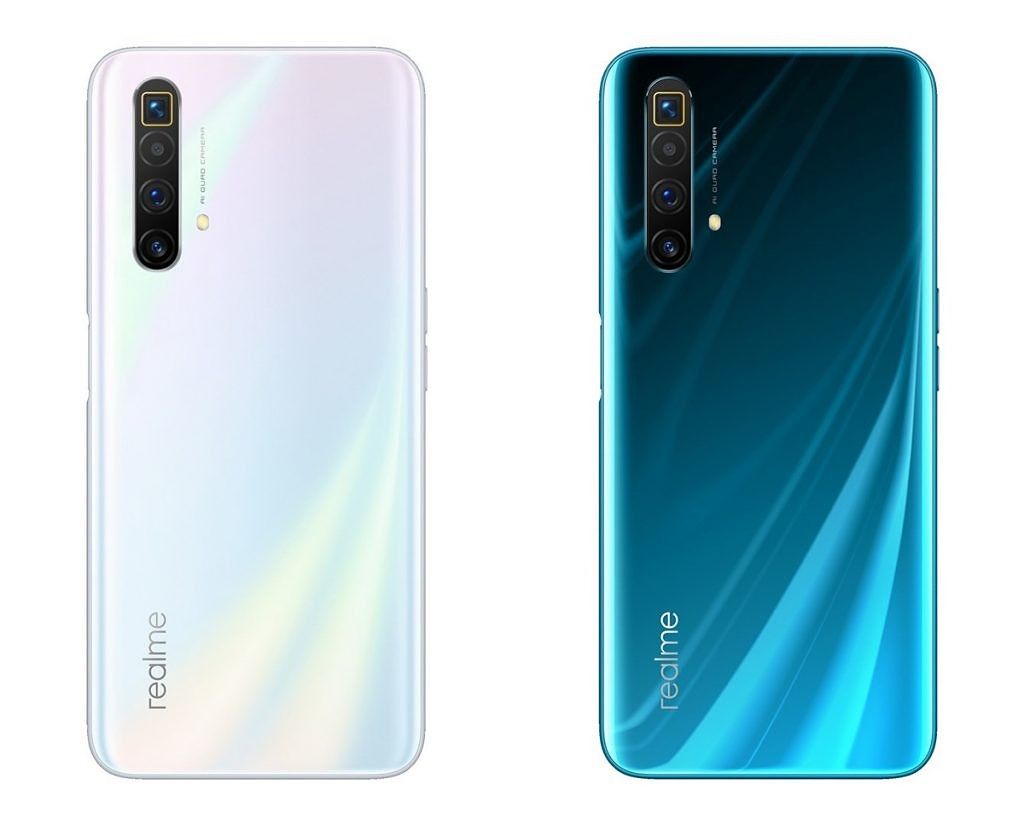
Realme X3 SuperZoom launches with the Snapdragon 855+ and 120Hz display

Design-wise, the Realme X3 SuperZoom looks quite similar to the X50 5G, which launched in China at the beginning of the year. It features a similar-looking 6.6-inch Full HD+ display with an LCD panel and a high 120Hz refresh rate. The display is protected under Gorilla Glass 5. Since this is an LCD and not an OLED panel, the X3 SuperZoom features a side-mounted fingerprint scanner – also seen on the X50 5G as well as the Realme 6 and 6 Pro. Readmore...

ALT_IMG

LG Optimus G Pro (Unlocked)

LG F240S Optimus G Pro 4G LTE is a new and updated version of Optimus G smartphone and comes with notable enhancements in display, size and processor. It features a huge 5.5-inch True Full HD IPS Plus LCD that essentially makes it a phablet. Readmore..

Alt img

Features Canon 650D and Nikon D5200 Which One is Best?

The beginner segment is always interesting to discuss, because the camera in this segment is still quite affordable but its already abundant and can be therefore people are no longer interested in buying a more expensive camera class. Readmore...

Alt img

Review OPPO Find 5

In 2013 was the triumph of mobile phones with a screen resolution of Full HD TV rival. OPPO Find 5 is one of them, 5 inch screen includes a resolution of 1920x1080 pixels. This makes the screen OPPO Find 5 has a density of 441ppi, alias the same as the Sony Xperia Z and HTC Butterfly. Readmore...

ALT_IMG

9 Smartphone with Most Durable Battery in the World

9 Smartphone with Most Durable Battery in the World. In addition to its features, things we should consider when choosing smartphones are the specifications, one of which is the battery life. Smartphone useless we have a sophisticated but battery endurance for a while, we will be annoyed at having to often to charge our smartphones. Readmore...

Wednesday, September 17, 2014

Specifications Nokia Lumia 900

0 komentar
Smartphone made ​​by Nokia is present to support the LTE 4G data network or fourth generation. Equipped with a large screen size makes you comfortable while browsing.Nokia Lumia 900 has a screen measuring 4.3 inches and is protected with corning gorilla glass so you do not have to worry about scratches. Depths up to 16 million colors and is equipped with AMOLED capacitive technology. So you will feel the ease of operation. While ClearBlack display feature will add to the clarity of the screen, so the screen remains clear even in the sunlight in the room or when low light.
Nokia Lumia 900
To add to your convenience in file storage, the Nokia Lumia 900 is equipped with a very large internal memory is 16 GB. Of memory is able to hold all your files such as music, images, photographs, videos and your favorite games. while for RAMnya lumia 900 is equipped with 512 MB ​​of memory for temporary data storage sebgai. Having a resolution of 8 mega pixel camera with the help of a lens (Carl Zeiss) you can capture precious moments with family, of course, the results are also not kidding. Density images up to 3264 x 2448 pixels combined with dual LED flash, capable of producing images that are crisp and clear.
In addition, the Nokia Lumia 900 is also capable of recording video at up to 30fps and 720p resolution.Unlike the Nokia Umia 800 , Lumia 900 has experienced an increase in focus and color balance. You can also make video calls using a powerful 1 MP camera and can record video up to 15 fps.
Specifications Nokia Lumia 900:
  • Screen: touch screen
  • Size: 12.78 x 6.85 x 1.15 inches
  • Weight: 1 kg
  • Screen size: 4.3 inches
  • Storage capacity: 16 GB
  • CPU Speed: 1.40
  • Operating system: Windows
  • Features display: gorilla glass
  • Wireless Connection: 4G, 3G, edge, wifi, bluetooth
  • Front camera: 1 MP
  • Rear camera: 8 MP
Continue reading →
Tuesday, September 16, 2014

10 Tips and How to Distinguish Genuine and Fake Smartphone

0 komentar


The rapid advancement of Technology Latest Gadgets prove that increasing the level of human intelligence. Various innovations and technological sophistication gadgets is increasing from year to year. Naturally, if the community is to make the latest gadgets as a way of life that must be met. Every new series with more advanced technological gadgets, it is not a few who are trying to have it despite having to queue up for days to be the buyer gadget in question. This has become a phenomenon that can not be avoided. Viewed from the side of the development of the telecommunications industry, it is certainly a good impact. But it turns out the impact of lifestyle development to have the latest gadget is not only limited to that alone. It is also often used as an opportunity for some people to make profits by not not kosher, ie fabricate products with the latest smartphone to benefit in a way not true. If this happens to you, you desire a smartphone that was counterfeit, certainly very painful. Therefore, as consumers we need to also know Smartphone Tips and How to Distinguish Genuine and Fake before we buy it. Merdeka.com As quoted from, here are 10 Tips and How to Distinguish Genuine and Fake Smartphone for you from being exposed to fraud by buying a smartphone false. READ detailed specifications

In general, for mobile devices coming out now able to run on minimal network GSM 850/900/1800/1900 and 3G HSDPA 850/900/1900/2100, but for prosthetic devices can not do. In addition to the network, from the specification of the processor is also used as the standard assessment. Then, from its RAM and ROM capacity will see the difference. In the original device, in general, the capacity of the RAM and ROM will be greater, whereas in counterfeit products is very limited even with only 512MB only. Not only that, camera, screen, Wi-Fi, Bluetooth until the battery can also be used as an assessment of whether the goods are counterfeit or not.

IMEI CODE CHECKS
Indeed, not all devices can use this code, but the majority can do. To check the IMEI number, you can press * # 06 # and the IMEI number when it appears on the screen, trying to match it with the IMEI in his box. After that, you can find out where the assembly of the product with a view of the IMEI number series to seven and eight. There are special codes that you can make a referral in the manufacture of devices that look on Google.

EXIF DATA USING CHECKS PHOTO

This method is relatively easy, because by using the data exif photo taken with a camera in the device, it can be seen clearly the authenticity of the smartphone. When you capture an object using a camera on a mobile device, when the results are in check in the Gallery or also when transferred to a PC, the properties will be seen the data exif details.

CHECKS WITH APPLICATION BENCHMARK

In this way, it will be more reliable information about the mobile device that wants to know the status. Using Application Benchmark test, it can be seen the performance up to the speed of the device.

CHECK FORM DESIGN AND COLOR

In general, each vendor will always have a characteristic product release. Although it looks the same, but the shape, design and color of the original and the fake device is different. Weight, size and detail of the display device can also be used as a reference to determine whether goods are counterfeit or genuine.

CHEQUE GUARANTEE CARD

Indeed, one way this can not be used as the main reference, because today many 'actors' who have started to make a warranty card which must also be false. However, not all fake device makers are able to also make a warranty card. Therefore, although can not be used as a primary weapon, but the way a warranty identification card is also quite effective.

FEEL

Of course, if an item is genuine juxtaposed with counterfeit goods, then the end result would indicate that the original device was the one who would come out as the winner. In general, access to and operation of a prosthetic device is slower and requires patience. That is because the capacity of RAM contained in it are too small to use with fast multi-tasking.

CHECK DETAILS TEXT

As featured in Business Insider (15/09/2013), it is advisable to check the paper mold on the device or other objects that come in one package. In general, there will be a typo writing or writings are also output from a particular country. In addition, the paper printout on prosthetic devices can easily be lost or faded.

NFC CHECKS BATTERY CONNECTOR

When you remove the battery from the device, it will look like a line of NFC connectornya tin yellow lines. However, in prosthetic devices, NFC Connector will be seen more clearly, whereas in the original device will look a little more impressed and protected.

COMPARE QUALITY AND COSTS

Of course, the last step can be done to detect fake goods or not is to look at the quality and price. Comparison of Specs and Price Latest gadgets you want to buy should be suitable. When juxtaposed with the original product, the specification and quality of counterfeit goods can not be outmaneuvered. And again, expensive stuff of course has its own qualities. Similarly, the original products that the average sold at a great price.
- See more at: idgadgeter.blogspot.com
Continue reading →

Hardbrick Solutions, Botloop, Softbrick, Fail Flash On Android

3 komentar


Hardbrick Solutions, Botloop, Softbrick, Fail Flash On Android - in some cases may often hear the term for the layman is still very foreign, but it is better understood that term with little hope of a solution to the current problems need not have to visit the repair service center.


Android Repair

The following terms and pegertian Hardbrick, Botloop, Softbrick, Flash Fail, Failure Recovery, Downloader Failure with corrective measures that should be done first, here the media using the JTAG repair:

Bootloop

Bootloop is a failed system boot occurs when the troubled, sometimes cause a media server that is not responding. Bootloop can be overcome by replacing the ROM, SD card Doing format, or also reflash back to stock.

SoftBrick

Soft brick is usually marked on the kernel splash hangnya HH (Hank logo). Softbrick can be overcome by mereflash reset to stock.

Hardbrick

Hardbrick known also failed boot bootloader which occurs due to the failure to detect the kernel, or the kernel driver that is not compatible with this hardware allows the kernel is not able to interact with the hardware.Hardbrick can be repaired with JTAG.

Fail flash

Failflash this happens sometimes after reflash stock that failed. Failflash has many forms are the most common PC logo that has an exclamation mark connected to HH. Can be fixed with a reflash stock ROM.

Failure Recovery

Failure Recovery trejadi bias HH hangs in recovery and not in the kernel splash. Can be fixed with reflash stock ROM.

Failure Downloader

Failure Downloader is failed boot failure recovery is almost similar but HH hangs in download mode (upgrade). Often repaired with JTAG.

Problems Hardbrick on android many factors that occur as a custom firmware - Flashing - Rooting - Install CWM - Modification / Oprek System - Change boot animation - Change Font - Chainfire tide and other factors may cause hardbrick on android.

Source from infogadgetbaru.com
Continue reading →
Tuesday, September 9, 2014

SanDisk Mobile Ultra Micro SDHC

0 komentar
SanDisk Mobile Ultra Micro SDHC Class 10 UHS-I + Adapter - 16 GB


Add memory capacity on an Android device, smartphone, tablet or your camera with SanDisk Ultra microSDHC UHS-I Card. With a class 10 speed makes it ideal to take Full HD video. Improved transfer speeds up to 30MB / s make the loading time of the application or file on your mobile device. You also get a SD Adapter is compatible with various devices that do not have a microSD slot but has a SD slot. With a variety of capacity options, you can choose according to need.
Ideal for Taking Video Full HD
SanDisk Ultra microSDHC UHS-I Card is a memory card with the UHS-I speed class 10 which can be used to capture Full HD video quality on smartphones or tablet yours. With transfer speeds up to 30MB / s, this memory card offers you a fast file transfer speeds to move data between a PC and a smartphone or tablet.
With Easy Transfer
In SanDisk Ultra MicroSDHC UHS packaging-I SD Card includes an adapter that allows you the time to move files from a PC to a smartphone or tablet. To transfer a file, you only have to enter into a SD adapter microSDXC then input into the SD card slot on your PC.
Durability Tough
SanDisk microSDHC memory card design for a variety of conditions. This memory card is waterproof and has been tested and can last up to 72 hours in salt water and fresh water in a depth of 1 meter. Not only that, the memory card is also shockproof and can withstand shocks of up to 500Gs. You can also take the SanDisk Ultra microSDHC UHS-I Card in various weather conditions as temperature resistant from -13 to 185 degrees Fahrenheit.
Application Memory Zone
Equipped with Memory Zone app that gives you easy to access, back up all of the digital data from the phone memory and put it in the cloud services.
Here the best product :
SanDisk 32GB Ultra Class 10 Micro SDHC up to 48MB/s with Adapter (SDSDQUAN-032G-G4A) [Newest Version]
SanDisk 64GB Ultra Class 10 Micro SDXC up to 48MB/s with Adapter (SDSDQUAN-064G-G4A) [Newest Version]
SanDisk Ultra 32GB MicroSDHC Class 10 UHS Memory Card Speed Up To 30MB/s With Adapter, Frustration-Free Packaging - SDSDQU-032G-AFFP-A [Old Version]
SanDisk 32GB Extreme U3/UHS-I SDHC with up to 60MB/s Read; 40MB/s Write (SDSDXN-032G-G46) [Newest Version]
      
Continue reading →
Sunday, September 7, 2014

12 Tips on Photographing Using Smartphone Camera

0 komentar
On this occasion we will share a bit of the Digital Photography Tips 12 Tips Photographing Using Smartphone Camera .
Mobile has changed its name to smart phones aka smartphones  thanks to the addition of features beyond its normal capabilities. One is the addition of a camera. 
Quite a lot of users  of smartphones  that rely solely on the mobile phone cameras and photographic documentation for the device. However, many of those who are less satisfied with the picture is. They often complain of the quality of the picture, both in terms of image quality and the picture quality of the content itself.
Here are  12 Tips on Photographing Using Smartphone Camera  from  Richard Koci Hernandez.
Lighting Issues
Take a photo in good light conditions-morning or late afternoon-has the possibility to change the image used to be incredible!
Do not Use the Zoom Feature
Results zooming of very bad phone and could be the beginning of a bad result. If you want to get the image closer, come closer with your legs, not with the zoom button.
Key Exposure and Focus
With the default camera app, tap / tap and hold the shutter button. When the flashing box sign, meaning that exposure and focus are locked. New take full image by pressing the shutter button or removing the finger from the screen.
Edit and Select the Best Photos
Hold yourself, do not  share all your shots.  Posting  or  share  only the good results to your followers, for example in Instagram, increases. "We do not want to see 1000 photos of your children, show only the most good!"
Never Too High Assessing Technical Issues
The technical problem is not a frightening specter, but train your ability to make observations that increases your photographic technique.
Learn to observe and look in more depth
Filters can not replace good eye. Note the moment, the light, and its object. If you are going to add sepia, black and white, or other filters later, go ahead. For the purposes of journalism, which should leave the filter name.
Secretly snap to get a natural result
Perform shooting secretly that human object does not know that the picture is being taken. The tendency of a person to know when being photographed is the style: the result is very natural.
Create Target and Deadline
Take 20 images for one object from different angles. You will see that the world looks different when viewed from different angles. Even if you just walked around a cup of coffee in the kitchen, will look different camera angles and lighting fell on him.
Know what you want to see before you can view
Make a list of what you want your photo today and find out. This will hone your intuition and experience.
Learn How it Works Other Photographers
Another way photographers take pictures would be a source of inspiration for you. Many things that were previously unthinkable became obvious after making observations. ATM: observe, imitate, modified to obtain better results.
Always Ready Alert and Focus
Make sure when your heart and mind say "Shoot!", Your camera is ready pressed. Do not let the camera / cell phone still in your pocket, in your purse, or up in the toilet.
Smartphones have cameras
Eleventh tips above are useless without the last tips, you can not take a photo without you using a camera.
So 12 Tips Photographing Using Smartphone Camera , may be useful and can be a reference for you.
Continue reading →

Sony Xperia Z3 Compact Tablet, World's Slimmest Tablet

2 komentar
As many predicted long before the event Internationale Funkausstellung (IFA) 2014, 5 to 10 September 2014. In the previous post author describes a number of smartphones that will be in the release even though not all of the authors mentioned, please read our previous post:  At least 10 smartphones to be unveiled at IFA  2014, and not only but a number phablet android smartphone and android tablet also introduced by a number of manufacturers electronics. Call it a Sony with the Sony Xperia Z3 Compact Tablet, Asus Memo Pad tablet 7nya Asus, Lenovo with Lenovo and Samsung Tab 8 with their latest tablet is a tablet Hero 8.
The thinnest tablet, the Sony Xperia Z3 Compact Tablet, IFA 2014
This time we will explore the tablet Sony Xperia Z3 Compact Tablet which has a thinner design than the Asus Memo Pad 7, 8 Tab Lenovo or Samsung Hero 8. Sony Xperia Z3 Compact only has a thickness of 0.64 cm. The tablet will be the thinnest tablet and well as the lightest in the world. following advantages - there are other advantages in the Sony Xperia Z3 Tablet this Compact:

  1. Tablet thinnest and lightest in the world.
  2. One - the only tablet that can currently control (remote) PS4.
  3. Waterproof and dustproof (Water and dust resistant).
  4. Designed with a screen 8 "Full HD TRILUMINOS with Live Colour LED technology.
  5. Using the world's fastest processor (Qualcomm Snapdragon ™ 801 processor with a 2.5 GHz quad-core CPUs).
  6. Supported by a large battery power, lasting up to 13 hours when used to play movies / video, wow.
Hmmm seems like the author started to think hard, how to have this tablet :).

Continue reading →

At least 10 smartphones to be unveiled at IFA 2014

0 komentar
IFA2014, Berli Germany, the latest android smartphoneAlmost all observers true smartphone - really confused which should be monitored, or maybe if you also want to buy a smartphone and wait for information about specifications - specifications that you will choose to continue to monitor the latest information with respect thereto. Which one would you choose? monitor and keep looking for news about the iPhone 6 is scheduled to be introduced Apple is dated 9 September 2014, or agenda planned IFA 2014 in Berlin Germany dated 5 to 10 September 2014, which will present information about android smartphones.

But of course that will eventually make you confused and have to decide where you are going to buy is when you monitor android smartphone. Because at least you will see the hardware specs and features - features that are shared 10 android smartphone that will certainly introduced at IFA 2014. Here's to 10 smartphone:

  1. Huawei Ascend Mate 7: The device is rumored to be present with a 6-inch 1080p display, 13 megapixel camera, fingerprint scanner and great battery capability.
  2. Lumia 730 smartphone is mid-range has a codename Superman rumors if this device is suitable for use as perangkt selfi2an, because it has a 5-megapixel front camera.
  3.  Well here's Lumia 830 Lumia device 1020 suitable for you who have a hobby as a photographer.Reportedly Lumia 830 has a 20 megapixel camera with a camera module PureView big in the back, similar to 1020.
  4. Samsung Galaxy Note 4   This time Samsung puts technology on the Samsung Galaxy Note 4 to this, with a 1440 × 2560 display with a 5.7 ​​inch Snapdragon processor 805 and may also be implanted 4GB of RAM. S Pen also be integrated with this device.
  5. LG G3 Stylus.  Device will be a competitor for the Samsung Galaxy Note 4.
  6. Sony Xperia E3. Sony may reveal model and affordable price for this E3 Xperia. And rumors are circulating this device uses a 1.2 GHz Snapdragon processor and a 4.8-inch screen 400.
  7. Sony Xperia Z3.  Rumors evolve if there is no significant change to this Z3 Xperia Xperia compared to Z2. However, the increase in the specifications for this device.
  8. Sony Xperia Z3 Compact.  Besides launching the Sony Xperia Z3, Sony will also release the Xperia Z3 Compact that will come with a screen smaller than the Xperia Z3 but have the same hardware specs with the Xperia Z3.
  9. Moto X + 1. Probably not much has changed from the previous Moto X but reported an increase in the side of the camera will be found on this device.
  10. Moto G +. All know if Moto G is the best smartphone Motorola, and we'll see what changes will be made ​​by Motorola, which reportedly improve the specification for Moto G + but will be offered at an affordable price.
Continue reading →
Friday, September 5, 2014

IPhone Photo Backup

0 komentar
appleWith the increasing popularity of portable iPhone camera, you have to know how her how to backup photos from your iPhone. This guide was written based on iOS 7, Mac OS X 10.9.3 (Mavericks), and Windows 7, but also will keep working on the old version of OS X, Windows XP and Windows 8.

It's important to know where will you keep backupsof your pictures, but usually you will perform a backup at least at one of the locations below:
  • Mac
  • Windows
  • Services cloud (like iCloud, Dropbox, Google+, OneDrive, etc.)
There are pros and cons in each method, so after reading the guidelines below, you can determine where the most convenient place to store your according to your photos.
Backup for Mac
If you mem- backup to your Mac, you should have the option to use iPhoto if you have installed , if not, the Image Capture application 's built-in is enough. We prefer to use the Image Capture application because it is easier, but if you organize all your photos in iPhoto, then you better enter your photos in iPhoto.
Backup Using the Image Capture:
image-capture-import-web
  1. Run the Image Capture from folders of your application
  2. Connect your iPhone to your Mac via a USB cable
  3. If you want the photo removed from your iPhone after you copy all the photos on your Mac, check thecheckbox at the bottom left that says " Delete after import "
  4. Choose where would you store your photos in the " Import to "
  5. If you want to copy all the photos from the iPhone, then select " Import All ". If you want to copy the selected photos, highlight the photos you want and click " Import "
Backup Using iPhoto:
iPhoto-backup-web
  1. Run the application iPhoto
  2. connect your iPhone to your Mac via a USB cable
  3. Select your iPhone under Devices tab ( Device ) on the left
  4. Write the title of the album
  5. Uncheck the checkbox " Split Events "if you do not want your image divided by date
  6. If you want to select certain photographs, click on the " Import Photos X "where X is the number of photos on your iPhone
  7. Once your photo is copied to your Mac, you can choose to delete the photo from the iPhone or not
Backup to Windows 
There are two ways To distinguish backup your photos to Windows, first use the File Explorer of Windows, the second way is using a photo copy. We recommend to use the File Explorer of Windows because it is easier to process.
Backup Files Using Windows Explorer:
iPhone-windows-web
  1. Download and install iTunes on your PC
  2. Connect the iPhone to your PC using a USB cable
  3. If you do not have permission to access your PC via the data your iPhone, iTunes will ask your permission to gain access to the data on your iPhone. Click " Continue "to allow
  4. iPhone will ask your permission if you believe your PC is connected to the iPhone. Press the " Trust"on your iPhone.
  5. Once completed, you will see your iPhone will appear in the File Explorer of your computer
  6. Double-click on the iPhone and are looking for where you save the photo, which is usually located in the folder " DCIM "
  7. Copy (or cut if you want to delete the photos from your iPhone) the photo you want to backup
  8. Paste the photos in the folder that you want in a PC
Photo Importing Using Backup Tool Installed:
trust-pc-web
  1. Download and install iTunes on your PC
  2. Connect the iPhone you into PC via cable USB
  3. If you do not have permission to access your PC via the data your iPhone, iTunes will ask your permission to gain access to the data on your iPhone. Click " Continue "to allow
  4. iPhone will ask your permission if you believe your PC is connected to the iPhone. Press the " Trust"on your iPhone
  5. Once that's done , you will see the iPhone you show up in File Explorer to your computer
  6. Right click on the iPhone you and select Import pictures and videos "
  7. In the new window that appears , you can ( optionally) click on the Import settings " to configure the details, such as where you want to backup your photos and if you want to delete photos from the iPhone you after import , as well as other settings
  8. Click Import " and photos you will be a backup to your PC .
Backup to Cloud Services:
Now the storage cloud is getting cheaper, you may have to weigh backup your photos on the service cloud .The guide below will tell you how to backup your photos directly from the iPhone to the service cloud .
There are several advantages to using the service cloud compared to a Mac or PC, namely:
  • Without having to connect your iPhone to your PC or Mac
  • Photos you remain safe even if your PC or Mac theft
  • Depending on the service backup , mem- can automatically backup your photos without having to remind you in advance
  • Depending on the service backup , you can access your photos from other devices.
Disadvantages of the service cloud itself, namely:
  • No storage space for your PC or Mac. Example, Dropbox only provides 2GB of space when you first register
  • Your photos should be uploaded to the service backup , the process will be slow (especially for those who have the internet speed is slow)
Backup to iCloud:
icloud-backup-web
Apple allow you to make backups of your photos to iCloud service, if you want it, you have to activate it through:
  1. Open the Settings
  2. Tap on iCloud
  3. Press the Storage & Backup
  4. Make sure iCloud Backup is active
It's important to remember that during the backup to iCloud it is very easy because it is integrated with your iPhone, on the other hand you can not bring a personal photo from iCloud backup.
With the recent announcement of Apple about iOS and OSX 10:10 8 Yosemite, Apple has made some improvements on how much you do backup your photos to your Mac via the cloud.
Backup to Dropbox Corousel by:
  1. Make sure you have a Dropbox account
  2. Download and install the Carousel of Dropbox
  3. Sign in using your Dropbox account and let the application run.
Remember, if you want your photos be backups correctly, you must ensure that you have the storage space on Dropbox to store the photos.
Backup OneDrive to Microsoft:
  1. Make sure you have a Microsoft account
  2. Download and install OneDrive
  3. Log in with your Microsoft account, turn Backup Camera when asked and let the application run.
Also you must remember that if you have the storage space on OneDrive to store the photos.
Backup to Google+:
  1. Make sure you have a Google+ account
  2. Download and install Google+
  3. Sign in using your Google account and turn on Auto-Backup
To distinguish Google+ lets you backup photos and unlimited video for free, but if you have a photo with a size larger then Google will turn it into a standard size.
The thing to remember when backup storage services using cloud
Use the backup data if you have very large data use, better make sure that you only do a backup of your photos only when using Wi-Fi.
Translate from indo-review.com
Continue reading →